Saturday, May 29, 2010

Video: Opera response to Google Chrome's speed test video

Remember the Google Chrome speed / performance test video? Well, Opera responded with an own performance test video as a reply to Google.

As known, the Opera browser and Google's Chrome are fighting for the fastest-browser-in-the-world crown and Opera is catching up right now with a faster Javascript engine in Opera 10.50. Time do do a little performance testing:


But though both tests do compare the respective performance using the all-known-potato-method, you cannot be exactly sure if a comparison can be done really accurately. Judge yourself.


Labels: , , , ,


Monday, May 17, 2010

Chrome performance better than lightning (or a potato canon)

Well, everyone already had the idea that Google's Chrome browser is one of the fastest browser out there. Be it rendering (by using the WebKit) or JavaScript (with the V8 engine), even giving every tab an own process seems to help.

But, until today, I did not know that Chrome is faster than sound or a flash (thunder and lightning). Or even... an ordinary potato gun.

Evidence needed? Watch this video, it explains how that is possible (scientifically).


Who would have thought that a browser outranges a potato canon? Well, now we know.

Labels: , , , , , ,


Saturday, December 20, 2008

Google Chrome without data sniffing: Iron is here.

A german software company named srware took the GPLed source code of Google's chrome and ironed it down to create a browser that does not phone home to Google any more. The latest release of Iron (1.0.155.0) from December 14 already contains WebKit version 528.5 and JavaScript engine V8 version 0.4.4.1 and therefore is slightly newer than the respective versions in Chrome.

Your data is private again

The goal creating a Chromeclone was simple: Although Google Chrome delivered fantastic rendering and JavaScript speed from scratch and is pretty stable and compatible, criticism arose because the new browser shared it's data with Google.

Every time a new URL is entered this data is sent to Google. And Google can match these with the browser because every browser gets a unique id when it is installed. Furthermore, the Google Updater is installed and runs in background every time you start your computer (check your Task-Manager for "GoogleUpdate.exe"). This and more is deactivated in Iron, according to this page.

BSD-licensed, USB-stick version and source available

The browser identifies itself as "Mozilla/5.0 (Windows; U; Windows NT 5.1; en-US) AppleWebKit/528.7 (KHTML, like Gecko) Iron/1.0.155.0 Safari/528.7". The geeks at srware provide downloads for an Iron-Installer, an Iron-USB-version (without installation) and the source code they altered. The source is available under a BSD-license, so everyone can use it completely free even for commercial products.

Conclusion, language tips and full incognito

The rendering and JavaScript performance of Chrome attracted us from the beginning, alas the privacy drawbacks stopped us from using it. Iron does a good job here and comes, as a bonus, wit a USB-stick version and without installation but preconfigured with the german language.

To change the language choose the "SRware Iron anpassen" icon (top right in the tab of the browser) and click "Optionen". Then click the third button ("Schriftart- und Spracheinstellungen ändern"), choose the tab "Sprachen" and select your language in the "Iron language" - dropdown.

One more option at startup is the "--incognito" parameter. Start Iron with this (i.e. like "IronPortable.exe --incognito" to immediately switch into the anonymous mode. Have fun!

Labels: , , , , , , ,


Tuesday, September 02, 2008

Google Chrome: A first little test with highly complex AJAX/Javascript web applications

Google Chrome - what is it's real performance for highly AJAX-based web applications?

Some five hours ago Google introduced Google Chrome and put it on their site for download. Google Chrome is a stand-alone web browser and therefore has to compete with browsers like Internet Explorer, Firefox, Opera and Safari. Here at first a core Javascript test (as stated in a previous Javascript-post):

Chrome 0.2FF 2.0.0.14FF3 RC1IE 7.0.5730.13Opera 9.27Safari 3.1.1
3471,826271,45447,040846,212358,26318,8
Time in milliseconds the browsers needed in this performance test

But Google Chromes main goal is (according to Google) an other goal than that of other browsers: Highly AJAXed Javascript "web applications" shall run faster and more safe with Google Chrome, thus enabling a new era of web based applications like Google Maps, Google Mail or others. Time to look at speed and compatibility issues with more complex applications, even though the browser is stated as a "Google beta". Again.

YAWB or not YAWB, that is the question.

Yet Another Web Browser? Or: Why is Google in the web browser market? Because that is Googles business, the idea fits. Why not presenting the browser as a gift and earning money with the applications they run?

Internas and testing environment

Time to do a kind of real life test using an internal application that makes heavy use of Javascript and AJAX. At the moment Google Chrome is too much of an early bird to do this excessively, but we can have a look under the hood and run a fairly complex application on it.

The new features include
  • A new Javascript Engine called V8 is in use.
  • Better performance through compiled Javascript, it is compiled into machine code and not necessarily always interpreted.
  • The new Javascript VM has a better garbage collection included to preserve memory.
  • Browser tabs or new browser windows run in dedicated threads.
The testing application has some thousands of lines of self-written Javascript-code and relies on Prototype and other frameworks. It (re)opens different "windows" as DOM-elements and is able to switch through them via ctrl-tab and shift-ctrl-tab. Data is drawn from the background via AJAX, the usability allows drag-and-drop of single (or multiple) elements from one window into others. The application "runs" on IE, Firefox and Safari. Pretty complex stuff for a first test.

Compatibility will be the key...

What use is a new browser if the sites you want to visit will not work with it? Right, none. So the browser has to be as compatible as possible. I was fairly surprised and impressed as I saw the application running smooth and dandy. There was no itch regarding the Javascript-compatibility, every function I tested simply worked. The whole Javascript-code ran without the need to apply a single patch or something similar from our side. You know the moments where you hope "ah, come on, it will work out somehow. I believe, I strongly believe..." and you run it and it works out? That was one of that rare moments. Impressive.

... and performance will be the door-opener.

So it seems to be pretty compatible, right, but the second side is, is it faster, more useable than other browsers? The rendering engine seems to be partly from the webkit.org - project, rendering was pretty fast and compatible (to say the pages looked like in other browsers). From the look and feel of the thing I would say Google Chrome is at least one of the fastest rendering browsers if not the fastest, anyway.

And the Javascript-performance was astonishing (see here for numbers of a normal Javascript test suite). The application, running pretty fast in Firefox 3 and Safari 3.1 got a little extra speed-kick. That way it really feels like a real application on the computer rather than rendered web results. The clear separation of tabs and windows into threads does its additional work: Because no tab has to wait until an other tab releases the processor you have the feeling that it works faster or smarter.

So is it worth the hassle?

I think it is worth giving it a try. I do not think that I will use it yet as a browser-user, because I need my Firefox-plugins or IE-updating. But I will definitely test it with/for Javascript and AJAX-driven pages and our own developments. The gain in there is definitely worth the hassle.

Labels: , , , , , ,


Saturday, May 24, 2008

Javascript core performance in actual browsers

Today more and more sites do use JavaScript excessively. Be it because of Ajax-functionality or CSS/JavaScript hacks, disabling JavaScript does not work on a daily based surfing any more. On the other side all major browsers got a new version released in the last two month or do have beta versions in the queue. Time to sum up some Javascript core performance tests to show which browser vendors/developers did their homework (right).

webkit.org's sunspider performance test


Result of Javascript performance tests in short

The graph above shows the time needed by every browser for the webkit test suite (running in a loop, time in milliseconds):

FF 2.0.0.14 FF3 RC1 IE 7.0.5730.13 Opera 9.27 Safari 3.1.1
26271,4 5447,0 40846,2 12358,2 6318,8
Time in milliseconds the browsers needed in this performance test

See the details of every webkit test in the graph below.

As stated the graph above shows the overall results of webkit.org's sunspider performance test.
webkit.org is an open source project which provides the source code the Safari browser (from Apple) and Adobe Air (from, well... Adobe) are based on. It hosts an online Javascript performance test under http://webkit.org/perf/sunspider-0.9/sunspider-driver.html (caution, this link automatically starts the test).

Why "yet another Javascript test"?

In this test the five browsers "Firefox 2.0.0.14", "Firefox 3 RC1", "Internet Explorer 7.0.5730.13", "Opera 9.27" and "Safari 3.1.1 (on Windows)" were tested, technically spoken pretty simple because: Firefox 3 RC1 was released some week ago along with the XP Service Pack 3 (system and/or Internet Explorer 7) updates and a valid performance comparison should be done with every major update.

Browser usage of goit-postal.blogspot.com: Remember, it's a website for technicians

So this test shall give an expression about the core performance of Javascript in yet available mainstream-browsers (and no, thank you, no flame wars intended). That is the reason why, for example, Opera 9.27 as last stable was tested and not the faster Opera 9.5beta (according to this place) and IE7 despite of IE8beta, so called nightly builds of the browsers were abandoned for the same reason. Compatibility and conformity is not an issue here, either.

That, too, is the reason the sunspider performance test was chosen for this benchmark: Sunspider mostly tempers with core JavaScript functionality, namely some mathematics or date calculations and string manipulations. That is why it is highly limited in its characteristics i.e. for "graphical" Ajax websites using DHTML and manipulating DOM (see "Limitations of the test" below). On the other hand this performance tests nature serves to test the base performance of the Javascript engines (i.e. low-level scripting speed and the speed of the interpreter / number crunching) from the mentioned browsers.

The performance test in detail

The test was done on the following machine/circumstances:
  • Intel PC with Pentium D 3.4GHz Dual Core (so environmental task do not play such a huge role becaus they may run on the other core), 2GB RAM (just used 380M of them), GeForce8600GT (this too means the graphics system did not really interfere that much ;-)
  • Windows XP SP 3 (SP3 freshly installed)
  • Internet Explorer Version 7 (patched through SP 3)
  • Forefox 2.0.0.14 and (more interresting) Firefox 3 Release Candidate 1
  • Opera 9.27
  • Safari 3.1.1 (Windows edition, of course ;-)
  • The browser was the only running application (despite the TaskManager)
  • All unnecessary services of Windows XP (or other vendors than MS) were stopped
  • The caches of the browsers where empty, the internet connection was dedicated (for the test)
  • All browsers were opened with the same resolution (1280x1024 on a 1900x1200 panel)
  • Browser plugins were not installed or, if so, disabled (if you installed Firebug on Firefox remember to disable it for testing purposes!)
At the end of this article you will find links which help to compare the results with your own computer/environment.

The webkit-tests themselves split into "3d", "access", "bitops", "controlflow", "crypto", "date", "math", "regexp" and "strings". Below is a graph showing these (without "strings" for better visualisation).

Single performance tests on webkit.org the browsers needed to complete

The graph above shows the time needed by the browsers to complete the tests (in milliseconds):


FF 2.0.0.14 FF3 RC1 IE .0.5730.13 Opera 9.27 Safari 3.1.1
3d 3.596,6 722,0 1.890,6 1.218,4 753,0
access 2.531,8 827,4 2.489,6 1.868,2 981,2
bitops 4.668,2 641,0 2.152,8 1.750,4 762,6
controlflow 225,2 75,8 663,0 265,6 171,8
crypto 1.505,8 387,8 1.381,2 593,0 497,4
date 4.859,4 481,8 1.266,0 619,0 668,8
math 2.643,8 652,4 1.697,0 1.312,8 775,6
regexp 1.115,8 327,4 406,2 0,0 362,4
string 5.124,8 1.331,4 28.899,8 4.730,8 1.346,0
Detailed time in milliseconds the browsers needed to perform the tests

The "string" - test is an exception in two ways: Firstly it is not visualized above because it would spoil the graph (the bar of the IE would be too long making other results more or less unreadable) and secondly it shows that the Internet Explorer at least has problems with strings and, probably, memory management (depending on strings and the testing-code).

Noteable, too, is the fact that the Opera-test on "regexp" delivers a timeline of zero milliseconds. Assumable there is a Javascript-error in Opera preventing the counter to count the time correctly.

Memory and CPU usage on webkit's test

One word about the memory: The memory was released after every test (webkit runs the tests more than once) by every browser as expected, because the tests are loaded separately in frames. All browsers (despite FF2 who nevertheless did aparently well in this test) do release memory of non-needed frames, nowadays.

Another
word about the CPU-usage: This is not totally empirical but I measured CPU usage from the lowest to the max utilization of usage like this:
  1. Safari
  2. Firefox3
  3. Opera
  4. Firefox 2
  5. Internet Explorer 7
I had no good tool on Windows XP to take an absolute accurate measure of the CPU usage but could survey the usage with a process messaging tool plus my ears: The computer I sat next to and tested this really sounds bad if an application needs only a little bit more performance than others. I definitely should buy another cooler for that processor if I want to keep it ;-).

Nevertheless, noteably is that only the Internet Explorer utilized (and needed) more than 50% of the overall CPU performance on the system (up to 80%): Seems that it is the only system that can utilize more than one CPU (and needs it, anyway ;-). But to be honest, Firefox 2 didn't sound good, either... .

Limitations of the test

Never forget that this is no "real-life-performance-testing". The tests driven here are, to say the least, mostly academical. At least they are not realistic as long as someone wants to write a ray-tracer in a scripting language. But they are intended (and pretty accurate) to give a feeling of the Javascript engines working in the tested browsers.

Additionally, the test was done only regarding "stable" versions of the tested browsers in the given environment. A well-used real-life-existing test like webkit served well because my interests are real life scenarios. I am sure someone can pimp up the string-tests of webkit.org for IE or install another version of Opera (not to mention the performance of Safari running native on Mac OS X, who knows), but that is not the essence of this test, that would be something different (like a performance tuning test). This test only shows the direction.

This means (of course): This test says (nearly) nothing about real-life-performance of, let's say, heavily used Ajax-features. It does in no way measure the speed how DOM/DHTML or even graphical rendering is done by the browsers. Or garbage collection of Javascript in general (perhaps in special :), and therefore, in the real browser world. This would be a complete other kind of testing (Upcoming soon! Watch out your theatre or this site for more details!).

Conclusion: Why this test has been done and what I learned from it

Of course, testing done right needs time. Preparing the machine, restarting, emptying the cache, providing in any way you can think of that the data is as valid and correct as possible. Why did I waste my time although there are so many Javascript-testing-scenarious and results out there? Because the world keeps on changing. If you only change one single component (in computer life that normally is a new browser or
[minor] operating system version), all other components (like speed, memory etc.) may behave in an other kind.

One thing I learned (and was more than eager to test) was that Firefox 3 is using a new memory management, system wide (and for Javascript). I know that the old memory management was not at it's best, not to speak about Javascript memory leaks. Not the best base to throw in a long running RIA application. Another thing was that I heard that FF 3 competes better than Safari on the webtoolkit - test.

webkit.org provides the source code for the Safari browser. I tested some very complex Ajax framework on a Safari browser and was astonished about it's speed. Some day I heard that Firefox 3 slew Safari on it's own battleground: The webkit sunspider performance test.
Time to figure that out.

Nevertheless, (as you surely guessed till now) providing a so called "RIA" Application based on Javascript with my colleagues, it was time to make detailed and own-experienced performance testings for the existing possibilities out there. The surprising parts (some seen at the charts above) are, more or less that
  1. Webkit (Apple) astounded me because our (JS/Ajax-)applications ran recognizable three to four times faster using Safari on Mac, I saw this month ago (and though compatibility issues are a problem we really think to deploy this platform)
  2. Firefox 2 was beginning to be not as slow as Firefox 1.0/1.5 (or Mozilla, but it is still sometimes too slow) and then started to get slower again (memory usage "degregaded")
  3. Firefox 3 came with a new memory management and the capability to also resolve memory of Javascript-objects of certain depths (an old known Firefox 2 bug), so Firefox 3 definitely was/is an option
  4. The crown of performance is not the Internet Explorer any more (webkit, anyone?)
  5. Safari scared the hell out of me being that performant in ("graphical") Javascript (DHTML/DOM/Javascript-performance)
  6. I read that Firefox 3 should be faster than Safari at webkit.org which - frankly - I could not believe (and did not test on the longtrail. But I will.)
What is missing

Testing the core performance of Javascript in todays browsers is okay. But it does not give real facts or benchmark results you may rely on deploying complex Javascript-based Rich Internet Applications. Even so, every application is different.

The next performance test on Javascript will try to clearify DOM/DHTML - changes and the performance-behaviour respective to the used browsers and browser rendering engines. My guess at the moment is that webkit (Safari) is top-notch there, but who am I to say that in a changing world?


Appendix: Performance-Links webtolkit.org (alphabetically):

Performance of Firefox 2.0.0.14
Performance of Firefox 3 RC1
Performance of Internet Explorer 7.0.5730.13
Performance of Opera 9.27
Performance of Safari 3.1.1


Labels: , , , , , , , , ,


Friday, February 02, 2007

Totally secure internet-browsing in 15 minutes

Browsing the internet without fear

Nowadays, the internet is a hazardous place. There are viruses, trojans, Cookies that store and reveal your data, people phishing your money from your bank account with special worms and so forth. The problem is, you never can be sure if your computer is suffering from malware and re-routes your online-banking-request to some russia servers. Hell, I am not sure myself (and at least I am supposed to know such things).


The old solution: Rebooting your computer

In former times I solved the problem pretty easy: I downloaded a bootable Linux CD, i.e. the Knoppix Live CD. All I had to do was to insert the CD, reboot the computer and, eventually, setup the network so I could browse the internet. The advantage of such Live CDs is obvious: They start a complete and fresh operating system every time, and because they do it from CD, malware can not change the programs or data and install unwanted software on the computer. But, be honest, do you want to reboot your computer (twice, you have to start your original OS again afterwards) to simply transfer some money via online banking? Because this all was to time-consuming I stopped doing it.

The next step was to split responsibilities between different Browsers. "Daily surfing" with IE and "secure surfing" with Firefox. But again, this is not totally safe. I used Firefox more and more and because of that I had to at least empty the caches/cookies/passwords from time to time to regain a little bit of security and privacy. That was no fun, either. And you never know when security holes will be exploited in the future, even if it's Firefox.


The new solution: Virtually, no security holes

Yesterday, I hit on something in the web that sounded promising to solve these problems. It is an article about setting up a virtual machine as a window, just like any other program you use on your computer on a daily basis. The punchline is that you do not have to restart your computer to start an other operating system from a so called Live CD image, no you run the complete OS in a separate window on your desktop. Then you can use Firefox in there to browse the web. And it is easily done, too.

All you have to do is download and install the virtual machine VMWare, get a Live CD - iso-file and setup the VM environment. A so called iso-file is nothing more or less than an image from a CD named "blahblah.iso".

The steps for that (in short form, for more information please visit lifehack.org) :
  1. Download and install VMWare for your operating system from this place. You need administrative access to install it, though.
  2. Download an iso-image of Linux. You can find Fedora Core here (approx. 700mb), Ubuntu Linux here (approx. 715mb) and, the smallest of all, Puppy Linux here. Fedora and Ubuntu will be easy to get up and running and have Firefox in their package, Puppy Linux will need less resources but a little hands-on experience shown below.
  3. Download the prepared VMWare configuration files from here and unzip them into a new folder. Open the file "OS.vmx" in this folder and edit the line that starts with "ide1:0.fileName =", this option must point to your iso-file. For example, if you downloaded Ubuntu and stored it in "C:\Linux" the line should be - ide1:0.fileName = "C:\Linux\edgy-desktop-i386.iso"
  4. Doubleclick on the file "OS.vmx" (to start VMWare) and wait.

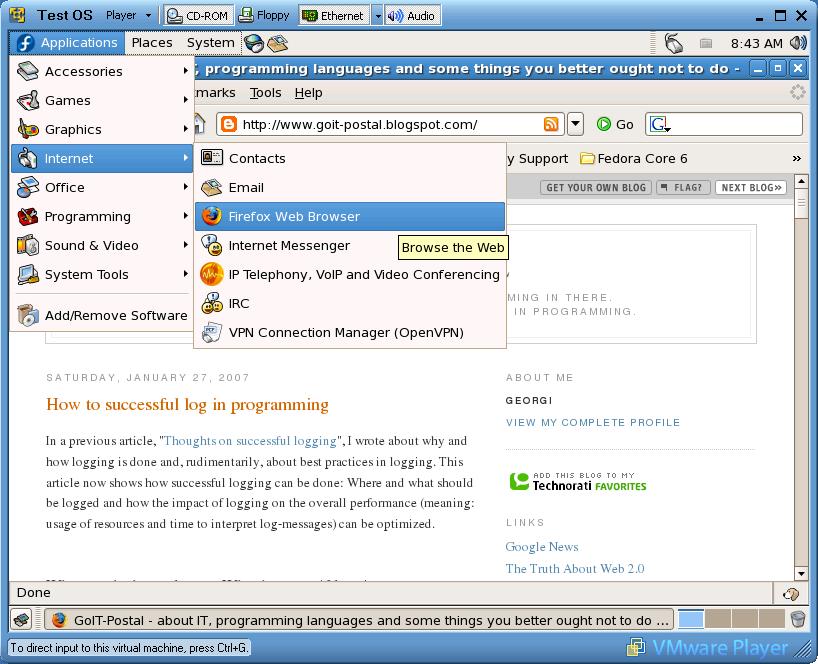
Fedora Core's Firefox is clickable as small icon left from the "System" - menue or in "Applications -> Internet -> Firefox", but this Fedora only serves resolutions up to 800 x 600

What happens is that VMWare starts the operating system from the iso-file as if it were an ordinary CD. That bears the advantage that malware cannot install itself on the "operating system in a window". Every time you restart VMWare will be as if you start it the first time. You now are safe to surf whatever you want, after shutting down VMWare your computer is in the same state than before.

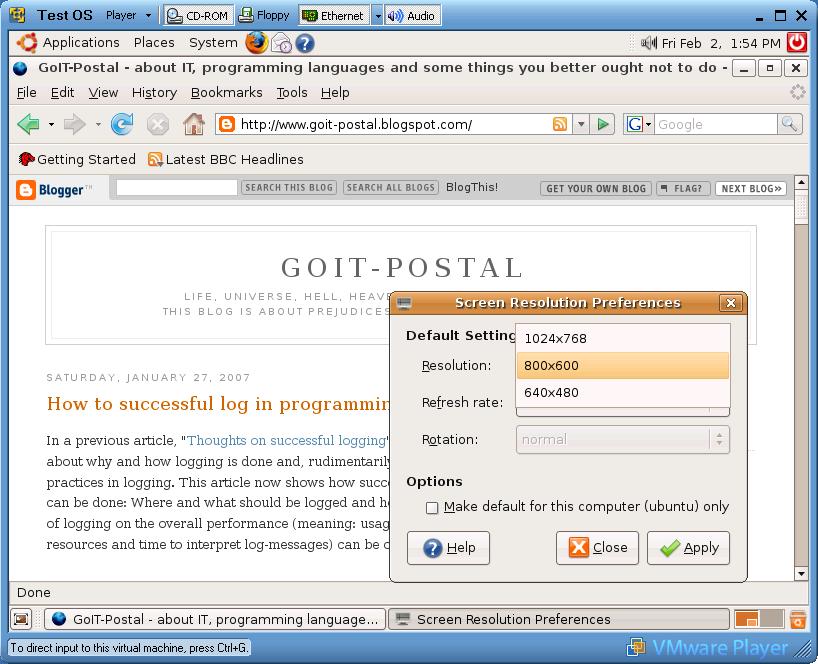
The screen resolution of Ubuntu and Fedora Core can be changed via menue "System -> Preferences -> Screen Resolution", this Ubuntu serves up to 1024 x 768

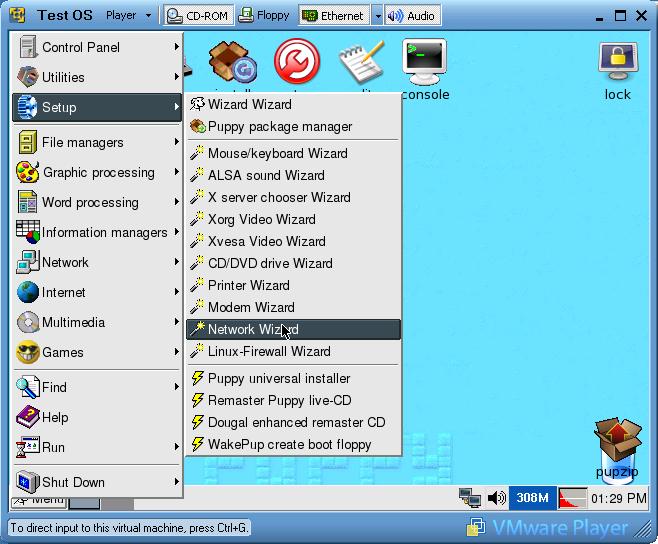
Ubuntu and Fedora Core automatically get the network connection from VMWare via DHCP. If you prefer Puppy Linux (because it's smaller, does not use that much resources and therefore starts faster) you will have to run the network wizzard, select the interface by pressing on the button "eth0" and then press the button "Auto DHCP". After this you can browser via the "Browse" - icon left on the desktop.

Puppy loves the network: Start the network wizzard to connect. For me Puppy only ran using the Xvesa and not Xorg window system and does not have the Gnome desktop installed.

Some words on usability and needed resources: I prefer Ubuntu over Fedora Core because it starts faster and provides you with a screen resolution up to 1024 x 768. But this merely is a matter of taste. A Pentium IV with 2GHz (AMD 2500+) and some 512 megabyte of RAM should suffice to run the virtual machine fluently on your computer. You can "suspend" the OS using a VMWare feature, this is like normal going in suspend mode and means that the "operating system window" will be stored on your hard disk. Starting it afterwards keeps your preferences and running programs. But it keeps the cookies, too.

So, happy safe surfing and remember: The fact that you are not paranoid does not mean, that they do not chase after you... .

Labels: , ,